
 feedshift docs
server settings
per-server config: linked source accounts, branding, and where alerts go when something breaks.
linked accounts
the source accounts feedshift uses to pull posts for this server. for x/twitter that's an x account you've linked.

the row shows connected as @handle when everything's healthy. if x logs the account out, you'll see a red warning here, and feeds using it pause until you reconnect. disconnect unlinks the account, then connect account opens the linker again. there's also /reset-links in discord if you want to relink without opening the dashboard, see reset-links.
each server has its own linked account. link the same x account in two servers and they each hold an independent session, so logging out of one doesn't affect the other.
branding
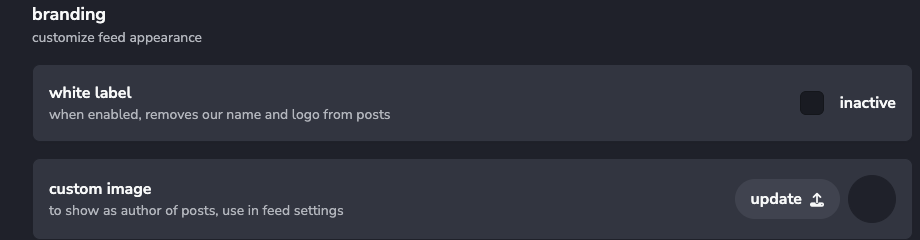
- white label: hides feedshift branding from delivered messages. premium or pro
- custom image: a per-server avatar that shows up as the message author on feeds where you've enabled use custom avatar in display settings. press update after picking the file
the custom image is server-wide, so it's the same author photo across every feed in this server. if you want a different avatar per feed, override the name and use a webhook with a custom image elsewhere.
alerts
route operational notifications somewhere you'll actually see them. useful for catching broken feeds before your community does.
pick a destination at the top:
- off: no alerts
- my dms: pings you directly
- server owner dms: pings whoever owns the discord server
- channel: post in a channel (or thread) of your choice
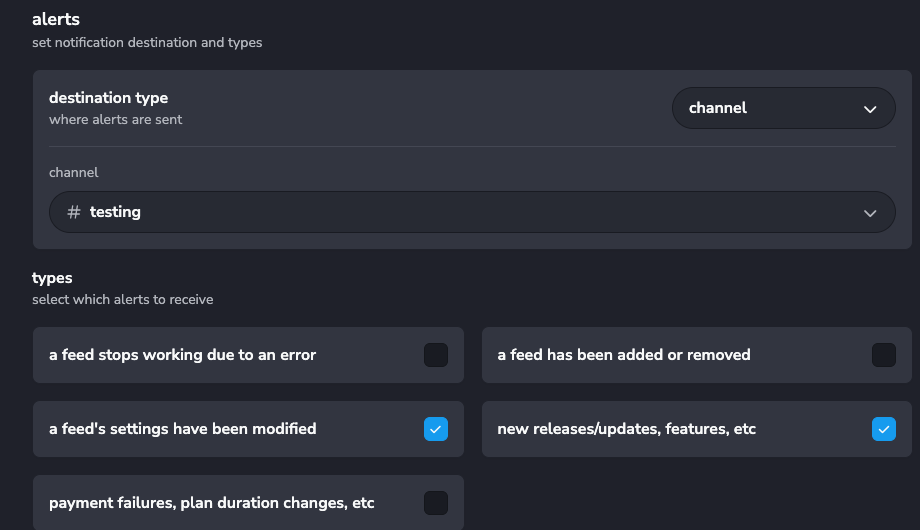
then check which events should ping it:
- a feed stops working due to an error: a feed errored out
- a feed has been added or removed: someone in the server made a change
- a feed's settings have been modified: someone tweaked an existing feed
- new releases/updates, features, etc: feedshift product news
- payment failures, plan duration changes, etc: billing events
if posts aren't showing up and you don't know why, the first one is the alert to keep on. for active mod teams, the add/remove and modify alerts are good for keeping a paper trail.